C457 Analysis
Contents
Introduction
An x-y stage, controller and software for conducting ASTM C457 Procedures A and B were developed for an MDOT Transportation Materials Research Center supplemental project in 2019. The stage is constructed from readily available components purchased from online retailers. A small number of structural elements were designed and fabricated to complete the stage. The system was designed with low-cost and ease of maintenance in mind, utilizing ballscrew actuators and an Arduino-based controller to drive the two NEMA17 stepper motors. The server operates on a Raspberry Pi and Franklin firmware is used for motion control. A common game controller is used to capture user input and control the stage. The user interface is provided over a web connection, supporting most internet browsers. The interface can be served over a local area network or a monitor, keyboard and mouse can be attached directly to the Raspberry Pi creating the standalone system.
Initial Settings
Organization
Reports generated by the system include a letterhead containing organization details.
- Click the "Organization Details" button.
- Enter the organization details to include in report letterhead and click "Save".
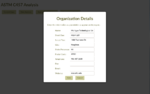
- Organization details are stored on the server.


Mapping Controller Buttons
The actions performed by each of the numerous buttons on the game controller is configurable, and a button map is required to perform an analysis. The software will not permit performance of an analysis until at least one button map. Multiple button maps can be stored, allowing customization for each user if required. If only one button map is stored, it will be the default. If more button maps are stored, one of the maps can be designated as the default map and will be selected by default upon starting a new analysis. Users are presented with s election of maps if there are more than one.
ASTM C457 Procedure A requires only three counters, one each for paste, void and "other". Procedure B requires one additional counter "Void Intercept". Additional counters are available for Procedure B, if desired. The software will not permit a map to be saved if the four required counters for Procedure B are not assigned to buttons. "Void Intercept" and any optional Procedure B counters will be ignored when performing Procedure A.
An additional action, "Save Position" allows the user to save the stage position during an analysis. Saved positions will be listed in the main interface. Clicking a saved position will cause the stage move to that position.
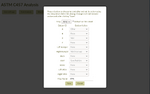
- Click the "Map Controller Buttons" button.
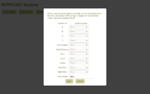
- Press a button on the game controller. Note the button name is highlighted in the dialog box.
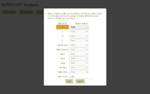
- Select the action to take when the button clicked.
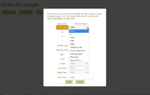
- Name the button map and click the "Save" button to save it.
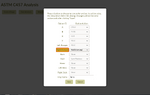
- If more than one button map is available, the display will include a map selection at the top of the dialog and a checkbox to indicate the selected map is the default map. The default map cannot be deleted.